Analysis
This section presents tools for analysing model generate data, including functions to extract metrics and plot graphs.
Setup
Selecting and configuring a Makie backend
The Makie.jl ecosystem is used to produce figures as part of the viz extension of ADRIA.
Makie is configured as an extension to ADRIA. This means the standard installation of ADRIA does not, by default, include the viz extension dependencies.
To enable the viz extension, firstly install the following packages:
]add GeoMakie GraphMakieMakie allows the selection of different rendering backends, this allows it to work in a variety of environments. To learn more about Makie backends, see here.
For example, let's install the WGLMakie backend. WGLMakie is more flexible for our workflows, though GLMakie is a good choice too.
To install the WGLMakie backend:
]add WGLMakieTo trigger compilation of the viz extension, we must always import the following dependencies in our analysis script(s), regardless of your backend selection;
using GeoMakie, GraphMakie

# Then import the chosen backend, such as:
using WGLMakie
The example scripts below assume the following imports
using ADRIA
# Always imported regardless of backend
using GeoMakie, GraphMakie

# Backend selection
using WGLMakie

# Statistics library used later in this doc
using Statistics
GLMakie inline plots
If using GLMakie, the plots will appear in the VS Code plots pane.
You may prefer figures to appear in a separate window, in which case deactivate the inline plotting feature.
Makie.inline!(false)Result Set
All metrics and visualization tools presented here can be used with data generated from ADRIAmod. Following, we show usage examples considering ADRIA result set rs:
# Load domain data
dom = ADRIA.load_domain("path to domain data", "<RCP>")

# Create some scenarios
num_samples = 4096
scens = ADRIA.sample(dom, num_samples)

# Run the model for generated scenarios
rcp_45 = "45"
rs = ADRIA.run_scenarios(dom, scens, rcp_45)

# Visualize results (in terms of scenario absolute coral cover)
s_tac = ADRIA.metrics.scenario_total_cover(rs)
ADRIA.viz.scenarios(rs, s_tac)
See the previous sections Loading a Domain, Generating scenarios and Running scenarios for more information.
Extracting results
A range of metrics are defined as part of the ADRIA framework. See the Metrics page for more details.
Here, we extract results for specific metrics for each timestep and sites for all the scenarios run. The result of each line above is a 3-dimensional Array of timesteps, sites and scenarios:
tac = ADRIA.metrics.total_absolute_cover(rs)
rsv = ADRIA.metrics.relative_shelter_volume(rs)
juves = ADRIA.metrics.relative_juveniles(rs)
We can also look at scenario-level metrics. They aggregate the above metrics across the site dimension and indicate the outcomes under a given intervention (or non-intervention) option and environmental condition.
The result is a 2-dimensional array of timesteps and scenarios:
s_tac = ADRIA.metrics.scenario_total_cover(rs)
s_rsv = ADRIA.metrics.scenario_rsv(rs)
s_juves = ADRIA.metrics.scenario_relative_juveniles(rs)
Visualization
The examples below are to illustrate usage. For further information on each method of analysis, see the documentation for the given function.
Some options shared for the plots below are defined here.
# Some shared options for the example plots below
fig_opts = Dict(:size => (1600, 800))

# Factors of Interest
opts = Dict(
    :factors => [
        :RCP,
        :dhw_scenario,
        :wave_scenario,
        :guided,
        :N_seed_TA,
        :N_seed_CA,
        :fogging,
        :SRM,
        :a_adapt
    ]
)
Scenario outcomes
One can plot a quick scenario overview:
fig_s_tac = ADRIA.viz.scenarios(
    rs, s_tac; fig_opts=fig_opts, axis_opts=Dict(:ylabel => "Scenario Total Cover")
)
save("scenarios_tac.png", fig_s_tac)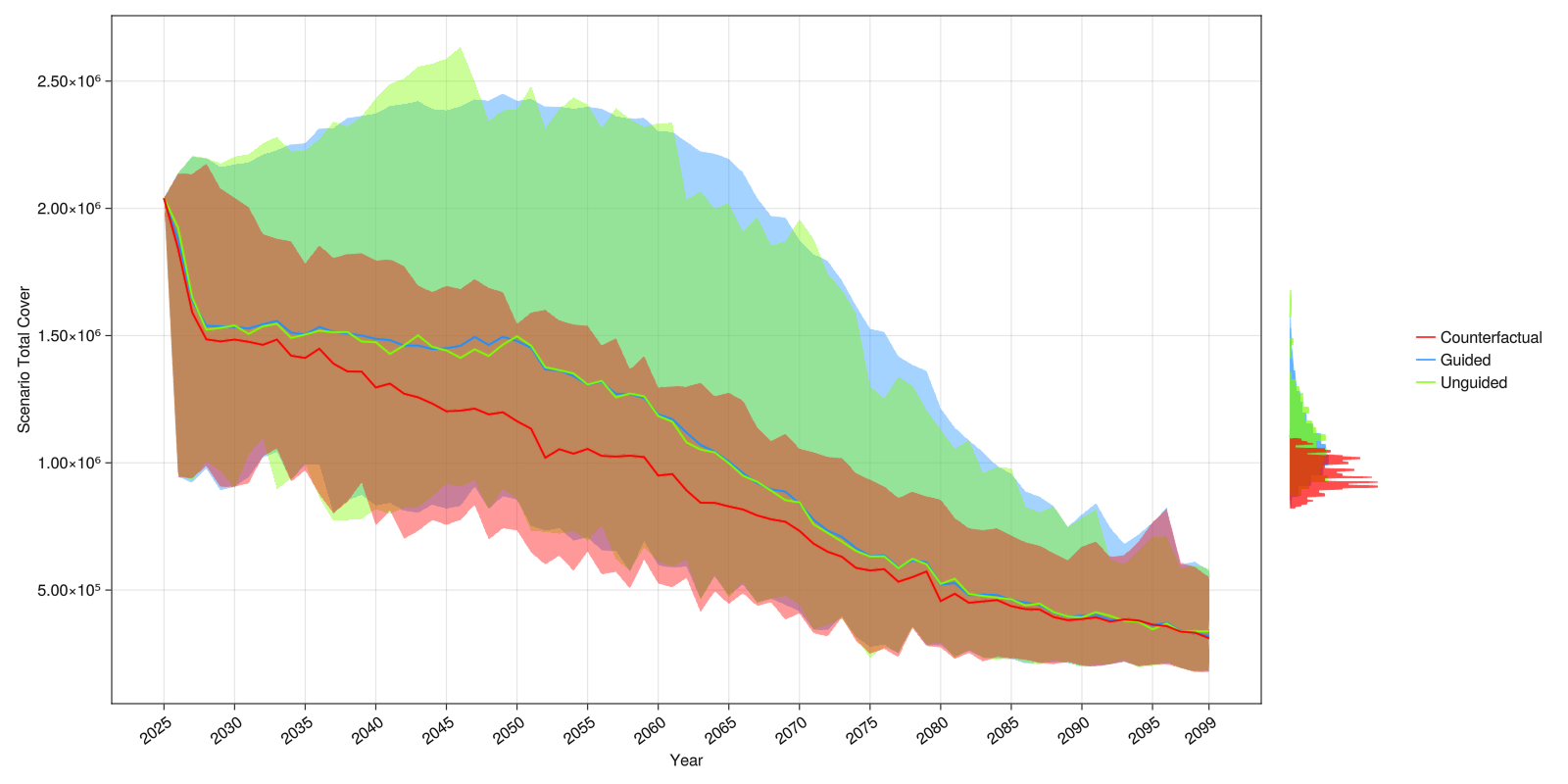
And compose a figure with subplots. In the example below we also use the parameter opts that accepts the keys by_RCP to group scenarios by RCP (default is false), legend to plot the legend (default is true) and summarize to plot confidence intervals instead of plotting each series (default is true):
tf = Figure(size=(1600, 600))  # size of figure

# Implicitly create a single figure with 2 columns
ADRIA.viz.scenarios!(
    tf[1, 1],
    rs,
    s_tac;
    opts=Dict(:by_RCP => false, :legend => false),
    axis_opts=Dict(:title => "TAC [m²]"),
);
ADRIA.viz.scenarios!(
    tf[1, 2],
    rs,
    s_juves;
    opts=Dict(:summarize => false),
    axis_opts=Dict(:title => "Juveniles [%]"),
);

tf  # display the figure
save("aviz_scenario.png", tf)  # save the figure to a file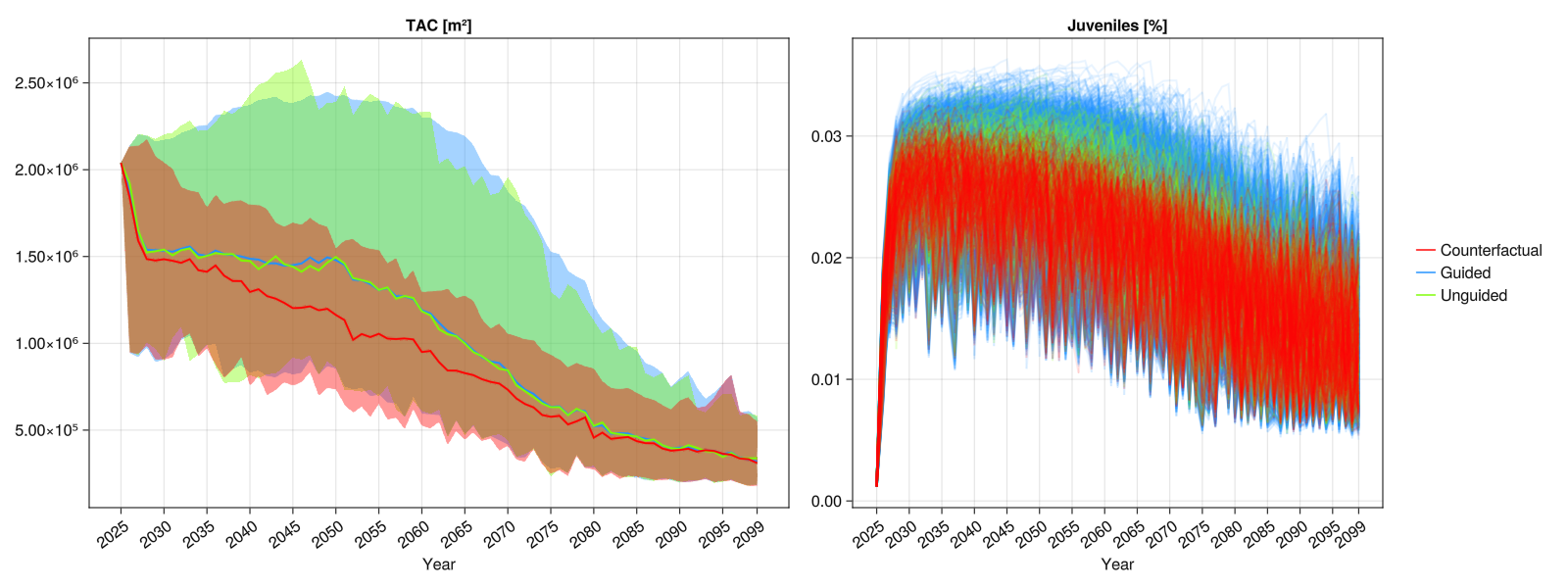
Intervention location selection - visualisation
Plot spatial colormaps of site selection frequencies and other available site selection metrics.
# Calculate frequencies with which each site was selected at each rank
rank_freq = ADRIA.decision.ranks_to_frequencies(
    rs.ranks[intervention=1];
    agg_func=x -> dropdims(sum(x; dims=:timesteps); dims=:timesteps),
)

# Plot 1st rank frequencies as a colormap
rank_fig = ADRIA.viz.ranks_to_frequencies(rs, rank_freq, 1; fig_opts=Dict(:size=>(1200, 800)))

save("single_rank_plot.png", rank_fig)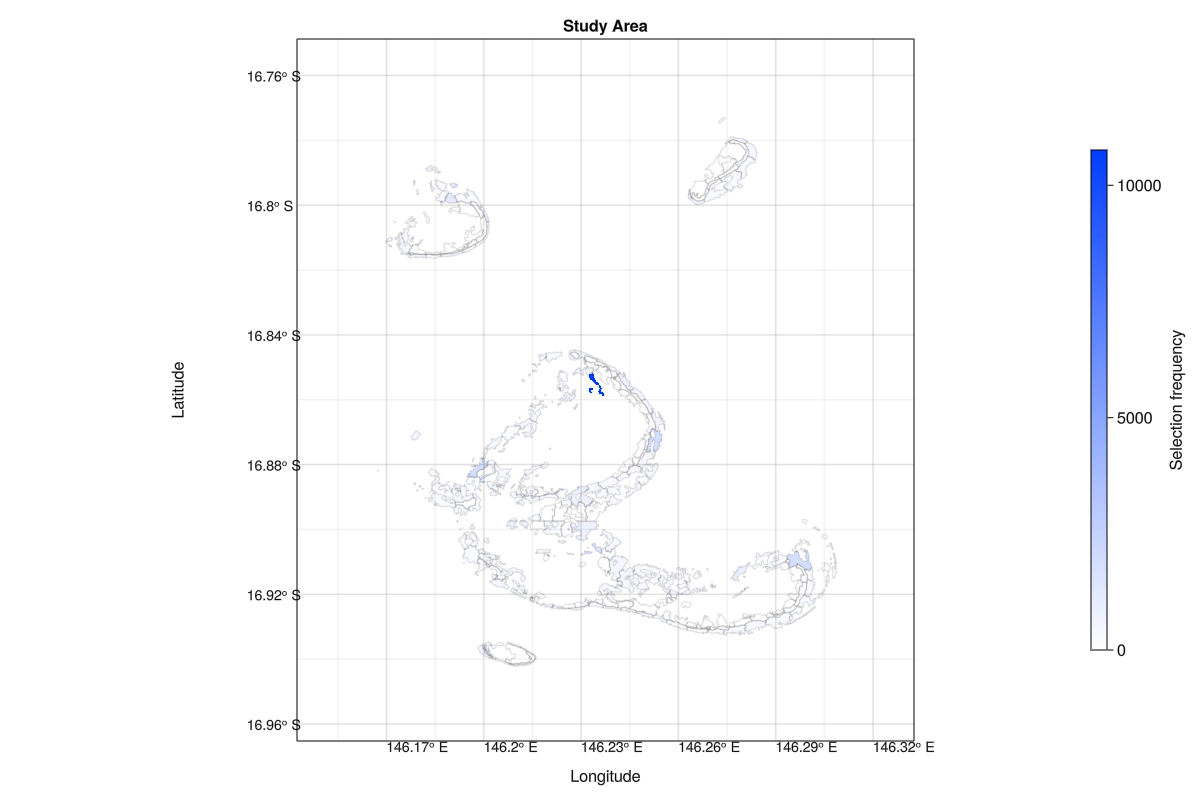
# Plot 1st, 2nd and 3rd rank frequencies as an overlayed colormap
rank_fig = ADRIA.viz.ranks_to_frequencies(rs, rank_freq, [1, 2, 3]; fig_opts=Dict(:size=>(1200, 800)))

save("ranks_plot.png", rank_fig)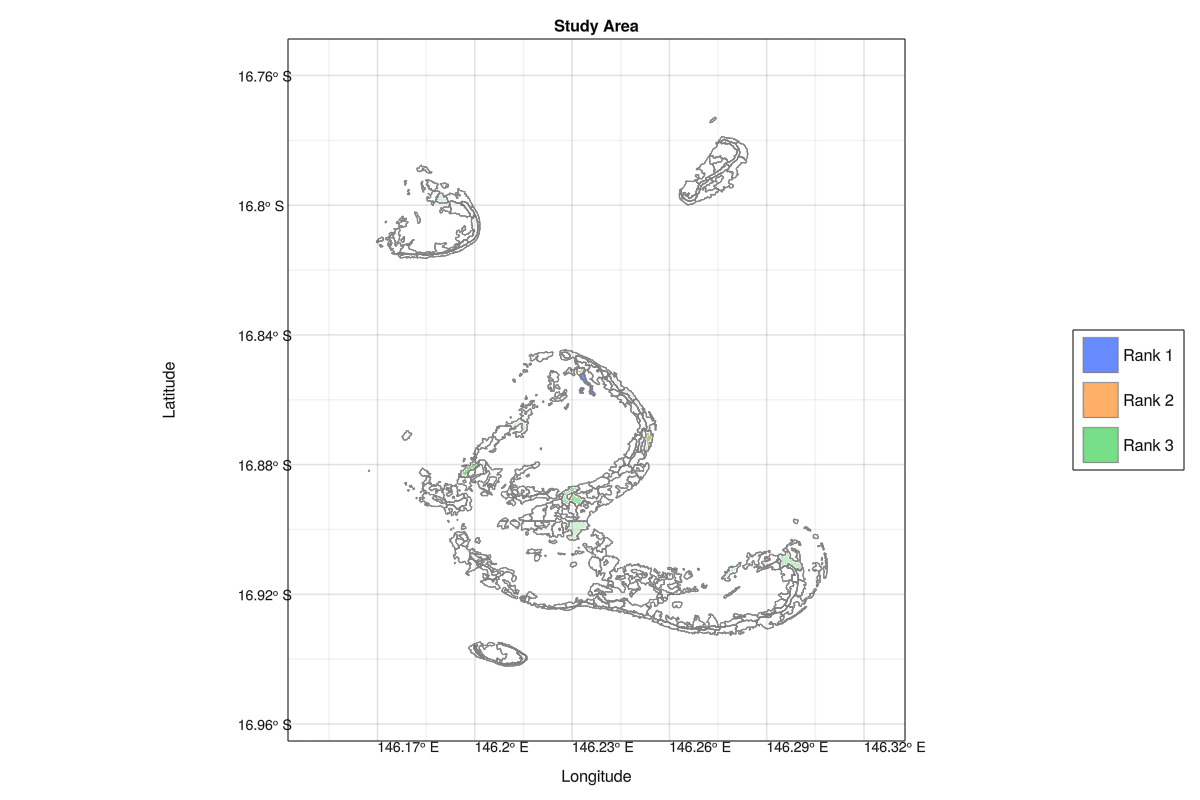
Intervention location selection - plot criteria maps
mcda_funcs = ADRIA.decision.mcda_methods()

dom = ADRIA.load_domain("path to domain","45")

scens = ADRIA.sample_guided(dom, 2^2)
scen = scens[1, :]

# Get seeding preferences
seed_pref = ADRIA.decision.SeedPreferences(dom, scen)

# Calculate criteria vectors
# Cover
sum_cover = vec(sum(dom.init_coral_cover; dims=1).data)
# DHWS
dhw_scens = dom.dhw_scens[:, :, Int64(scen["dhw_scenario"])]
plan_horizon = Int64(scen["plan_horizon"])
decay = 0.99 .^ (1:(plan_horizon + 1)) .^ 2
dhw_projection = ADRIA.decision.weighted_projection(dhw_scens, 1, plan_horizon, decay, 75)
# Connectivity
area_weighted_conn = dom.conn.data .* ADRIA.loc_k_area(dom)
conn_cache = similar(area_weighted_conn)
in_conn, out_conn, network = ADRIA.connectivity_strength(
    area_weighted_conn, sum_cover, conn_cache
)

# Create decision matrix
seed_decision_mat = ADRIA.decision.decision_matrix(
    dom.loc_ids,
    seed_pref.names;
    seed_in_connectivity=in_conn,
    seed_out_connectivity=out_conn,
    seed_heat_stress=dhw_projection,
    seed_coral_cover=sum_cover
)

# Get results from applying MCDA algorithm
crit_agg = ADRIA.decision.criteria_aggregated_scores(
    seed_pref, seed_decision_mat, mcda_funcs[1]
)

# Don't plot constant criteria
is_const = Bool[length(x) == 1 for x in unique.(eachcol(seed_decision_mat.data))]

# Plot normalized scores and criteria as map
fig = ADRIA.viz.selection_criteria_map(
    dom, seed_decision_mat[criteria=.!is_const], crit_agg.scores ./ maximum(crit_agg.scores)
)
save("criteria_plots.png", fig)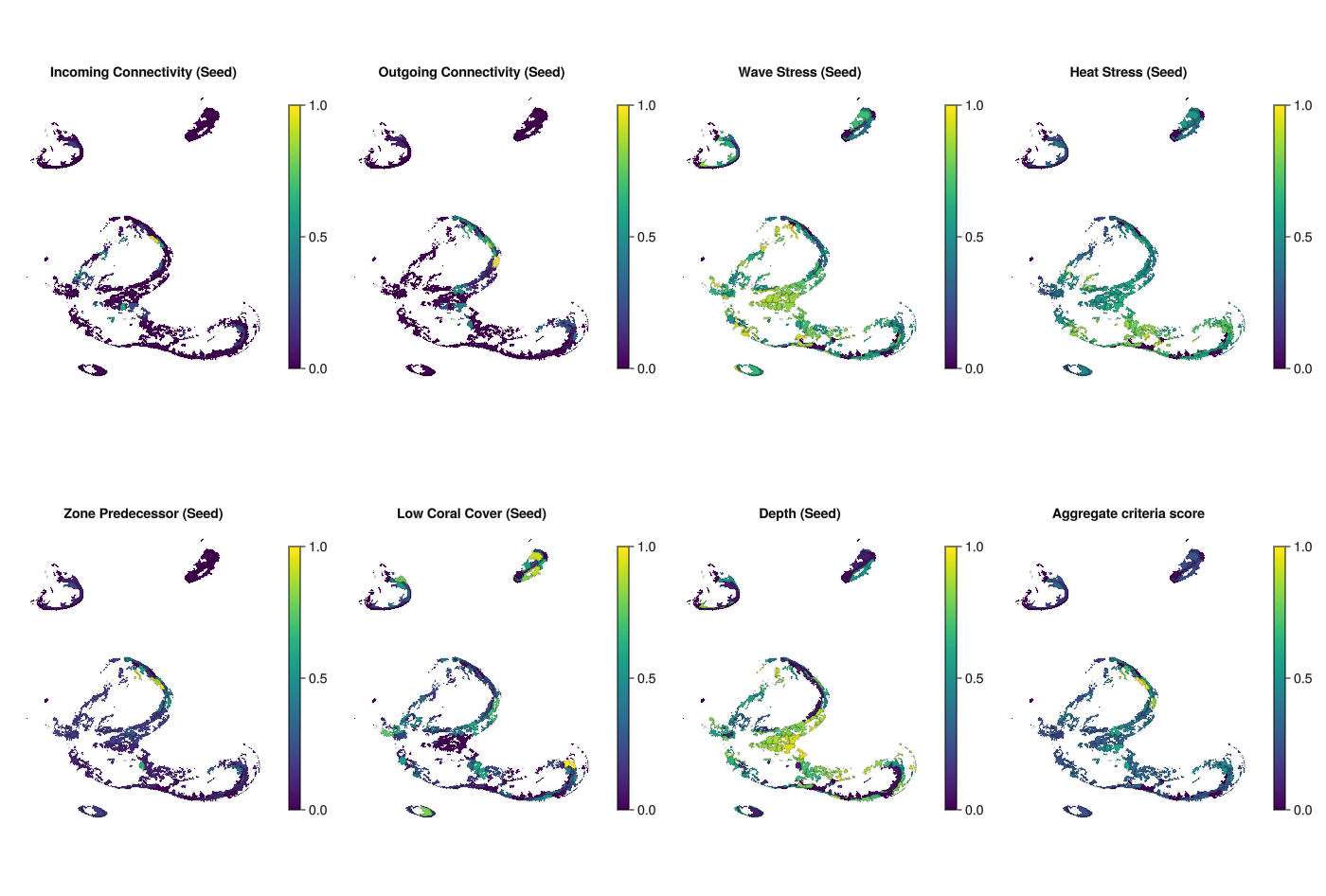
PAWN sensitivity (heatmap overview)
The PAWN sensitivity analysis method is a moment-independent approach to Global Sensitivity Analysis. It is described as producing robust results at relatively low sample sizes, and is used to screen factors (i.e., identification of important factors) and rank factors as well (ordering factors by their relative contribution towards a given quantity of interest).
# Sensitivity (of mean scenario outcomes to factors)
mean_s_tac = vec(mean(s_tac, dims=1))
tac_Si = ADRIA.sensitivity.pawn(rs, mean_s_tac)
pawn_fig = ADRIA.viz.pawn(
    tac_Si;
    opts,
    fig_opts
)
save("pawn_si.png", pawn_fig)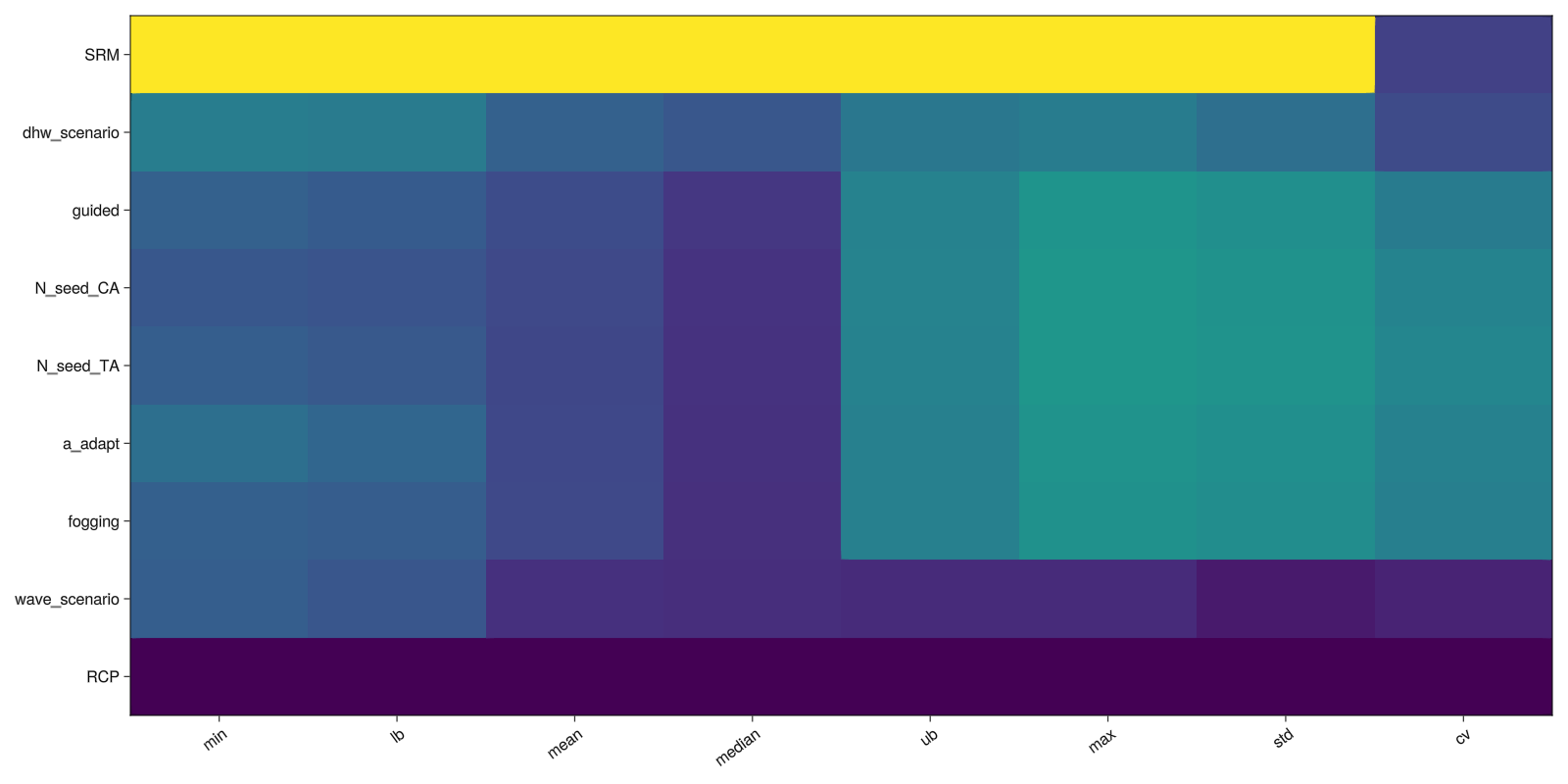
Temporal Sensitivity Analysis
Temporal (or Time-varying) Sensitivity Analysis applies sensitivity analysis to model outputs over time. The relative importance of factors and their influence on outputs over time can then be examined through this analysis.
tsa_s = ADRIA.sensitivity.tsa(rs, s_tac)
tsa_fig = ADRIA.viz.tsa(
    rs,
    tsa_s;
    opts,
    fig_opts
)
save("tsa.png", tsa_fig)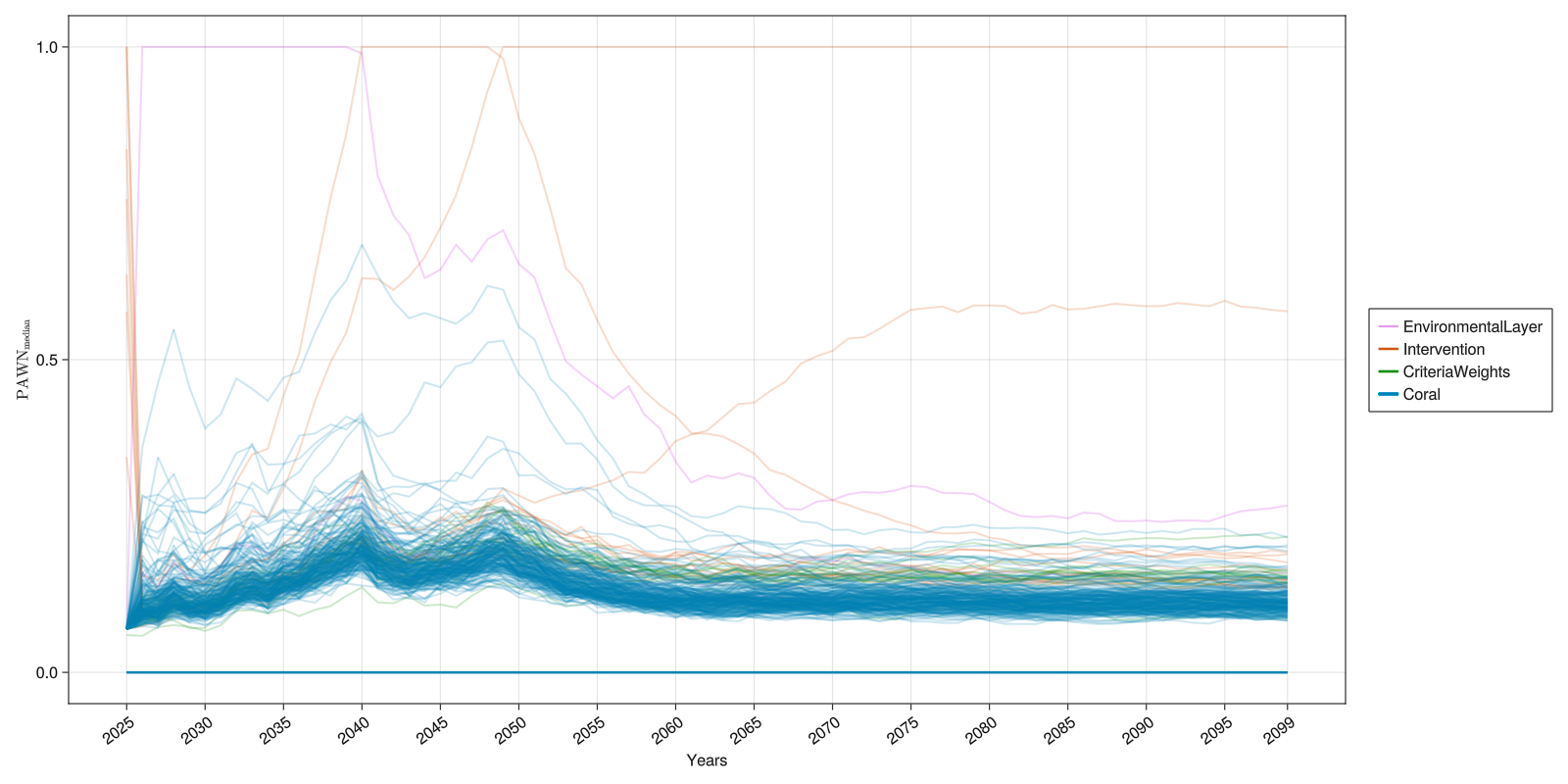
Convergence Analysis
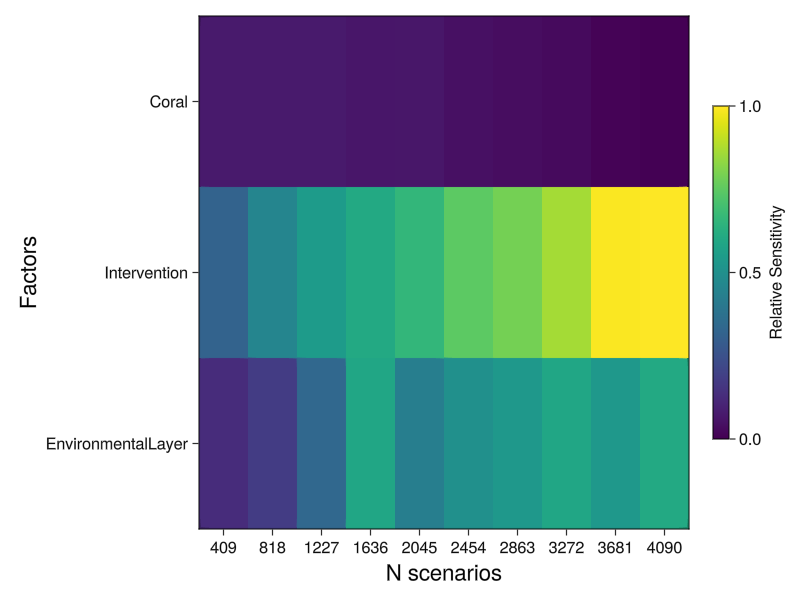
When undertaking sensitivity analysis it is important to have a sufficient number of samples such that the sensitivity measure converges to a stable state. To assess whether sufficient samples have been taken a convergence analysis can be conducted. One approach is to draw a large sample and then iteratively assess stability of the sensitivity metric using an increasing number of sub-samples. The sensitivity metric is described as having "converged" if there is little to no fluctuations/variance for a given sample size. The analysis can help determine if too little (or too many) samples have taken for the purpose of sensitivity analysis.
The function sensitivity.convergence can be used to calculate a sensitivity measure for an increasing number of samples. The result can then be plotted as band plots or a heat map using viz.convergence.
outcome = dropdims(mean(ADRIA.metrics.scenario_total_cover(rs); dims=:timesteps), dims=:timesteps)

# Display convergence for specific factors of interest ("foi") within a single figure.
# Bands represent the 95% confidence interval derived from the number of conditioning
# points, the default for which is ten (i.e., 10 samples).
# Due to the limited sample size, care should be taken when interpreting the figure.
foi = [:dhw_scenario, :wave_scenario, :guided]
Si_conv = ADRIA.sensitivity.convergence(scens, outcome, foi)
conv_series_fig = ADRIA.viz.convergence(Si_conv, foi)
save("convergence_factors_series.png", conv_series_fig)

# Convergence analysis of factors grouped by model component as a heat map
components = [:EnvironmentalLayer, :Intervention, :Coral]
Si_conv = ADRIA.sensitivity.convergence(rs, scens, outcome, components)
conv_hm_fig = ADRIA.viz.convergence(Si_conv, components; opts=Dict(:viz_type=>:heatmap))
save("convergence_components_heatmap.png", conv_hm_fig)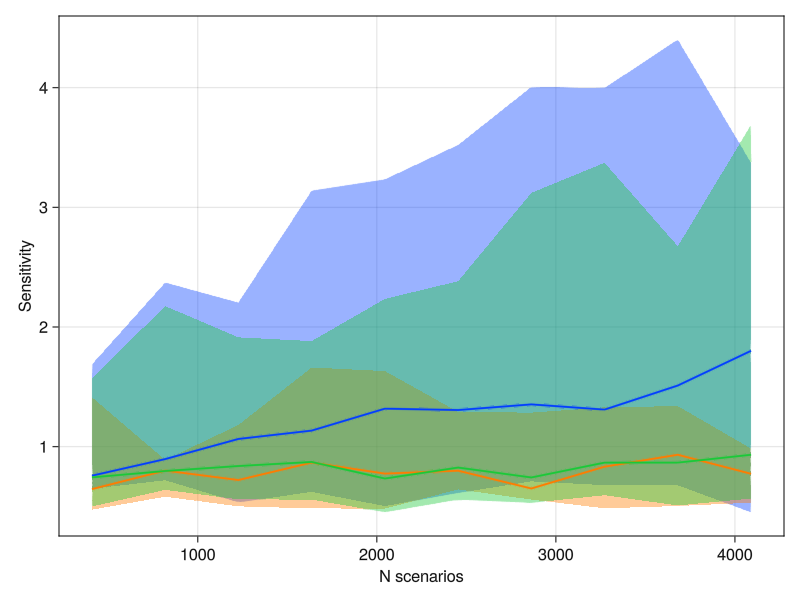
Time Series Clustering
The Time Series Clustering algorithm clusters together series (typically time series) with similar behavior. This is achieved by computing the Euclidian distance between each pair of series weighted by a correlation factor that takes into account the quotient between their complexities. When plotting clustered_scenarios, the kwarg opts can be used with the key :summarize to plot the confidence intervals of each cluster instead of each series individually (default is true).
# Extract metric from scenarios
s_tac = ADRIA.metrics.scenario_total_cover(rs)

# Cluster scenarios
n_clusters = 4
clusters = ADRIA.analysis.cluster_scenarios(s_tac, n_clusters)

axis_opts = Dict(
    :title => "Time Series Clustering with $n_clusters clusters",
    :ylabel => "TAC [m²]",
    :xlabel => "Timesteps [years]",
)
opts = Dict{Symbol, Any}(:summarize => true)

tsc_fig = ADRIA.viz.clustered_scenarios(
    s_tac, clusters; opts=opts, fig_opts=fig_opts, axis_opts=axis_opts
)

# Save final figure
save("tsc.png", tsc_fig)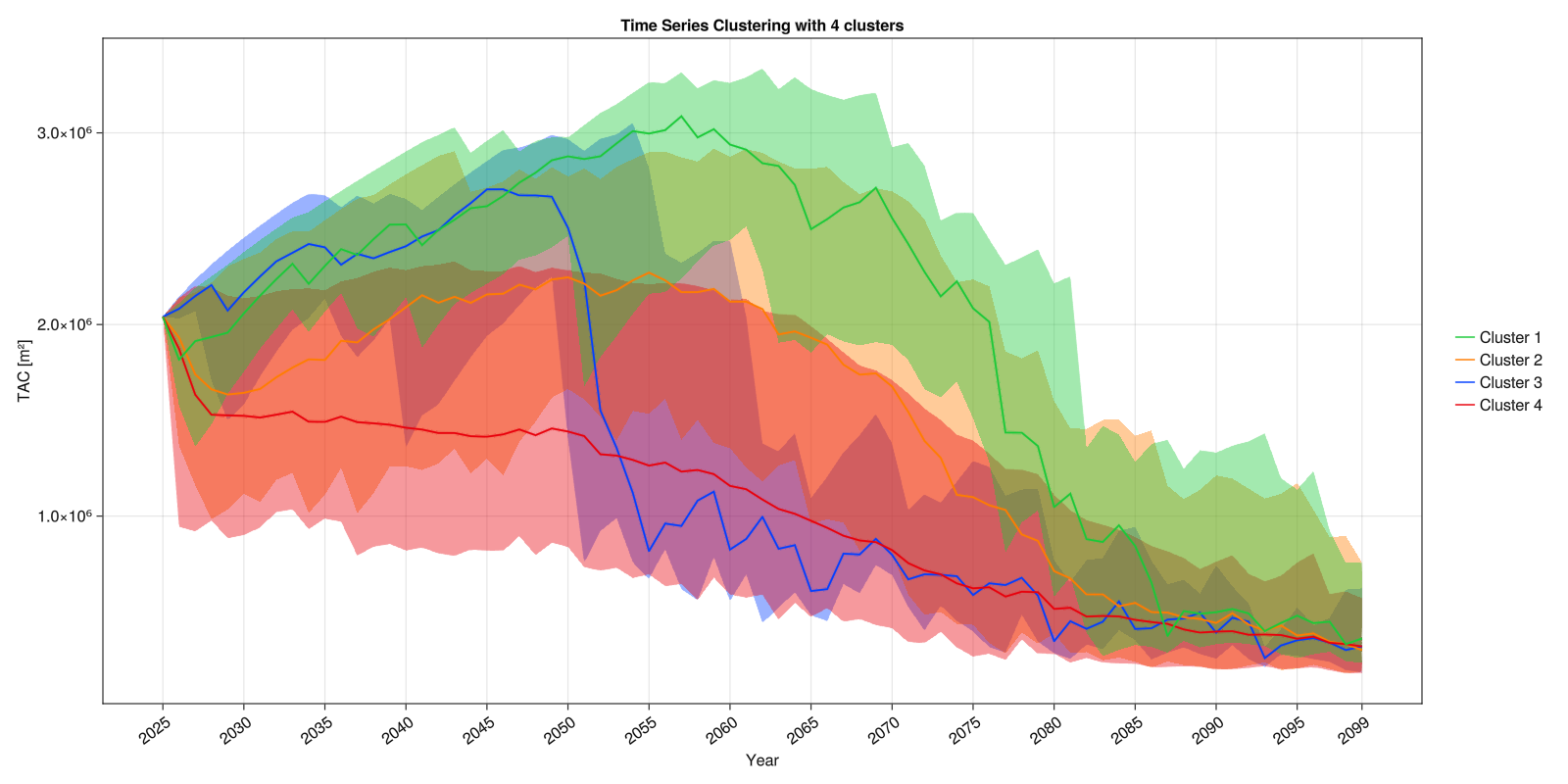
Target clusters
One can also target scenarios that belong to specific clusters (like clusters with higher median value for some outcome).
Here we use clustering to identify groups of time series for sites with low temporal variability in shelter volume across scenarios.
# Time series for each site summarizing median shelter volume (in cubic metres) across all scenarios
asv = ADRIA.metrics.absolute_shelter_volume(rs)
asv_site_series = ADRIA.metrics.loc_trajectory(median, asv)

# Cluster sites with similar shelter volume time series
n_clusters = 6
asv_clusters = ADRIA.analysis.cluster_series(asv_site_series, n_clusters)

# find_scenarios computes median timeseries for each cluster
#   and by default calculates temporal variability of that median timeseries
# We target sites that belong to the two clusters with lowest temporal variability in shelter volume
lowest = x -> x .∈ [sort(x; rev=true)[1:2]]
asv_target = ADRIA.analysis.find_scenarios(asv_site_series, asv_clusters, lowest)

# Plot targeted scenarios
axis_opts = Dict(:ylabel => "Absolute Shelter Volume", :xlabel => "Timesteps [years]")

tsc_asc_fig = ADRIA.viz.clustered_scenarios(
    asv_site_series, asv_target; axis_opts=axis_opts, fig_opts=fig_opts
)

# Save final figure
save("tsc_asv.png", tsc_asc_fig)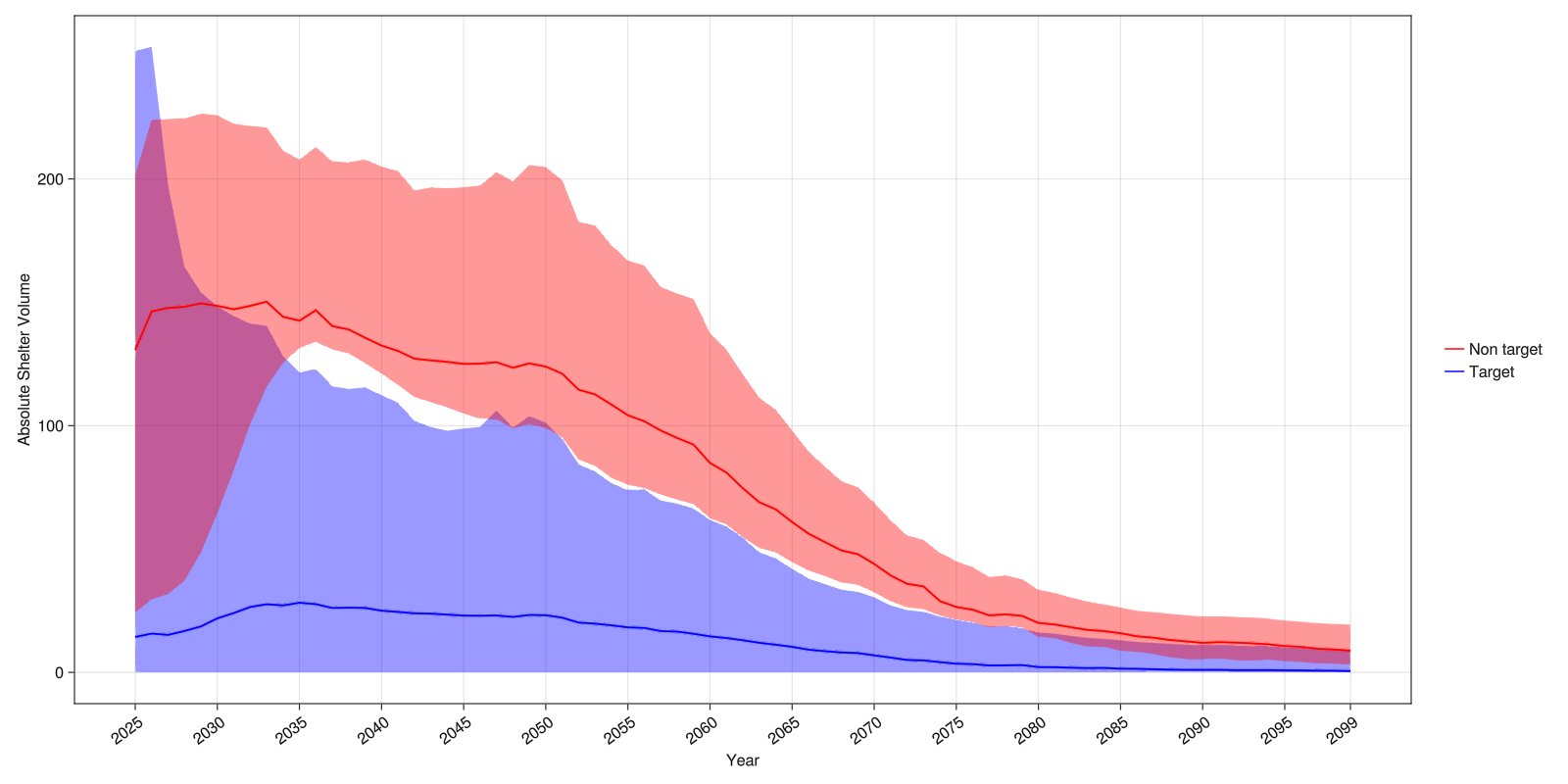
As expected, we see the sites in the target group have lower temporal variability. The non-target group has larger temporal variability. The sites could then be investigated further.
As the sites were selected using the median timeseries of two clusters, there is still a large range of shelter volume across sites at the start of the time series. Focusing on the lowest cluster or splitting into more clusters could produce a more homogeneous group of scenarios.
This can be interpreted as a form of scenario discovery where a target group of timeseries is summarised visually. Here the timeseries represent sites rather than scenarios. Using summarize, timeseries for scenarios could be obtained by aggregating over sites.
For this test dataset, findings in terms of scenario discovery suggest:
- Ensuring conditions for success: Low temporal variability in shelter volume involves sites that stay low. Temporal variability would likely not be interpreted as a success metric given that high temporal variability also reflects large declines in shelter volume.
- Avoiding failure: Both groups show declines across all sites using the median across scenarios. The analysis could be repeated to investigate how behaviour differs across scenarios, particularly in which interventions improve outcomes.
- Planning for failure modes: The non-target group of sites starts with higher shelter volume. While the median across scenarios declines, further investigation could test whether certain interventions cope better than others with changing conditions.
- Further deliberation: Discussion would likely further explore performance metrics other than temporal variability, and factors other than sites.
Multiple Time Series Clustering
It is possible to perform time series clustering for different metric outcomes and find scenarios that behave the same across all of them. Currently there is no visualization function for this.
metrics::Vector{ADRIA.metrics.Metric} = [
    ADRIA.metrics.scenario_total_cover,
    ADRIA.metrics.scenario_asv,
    ADRIA.metrics.scenario_absolute_juveniles,
]

outcomes = ADRIA.metrics.scenario_outcomes(rs, metrics)
n_clusters = 6

# Clusters matrix
outcomes_clusters::AbstractMatrix{Int64} = ADRIA.analysis.cluster_scenarios(
    outcomes, n_clusters
)

# Filter scenarios that belong to on of the 4 high value clusters for all outcomes
highest_clusters(x) = x .∈ [sort(x; rev=true)[1:4]]
robust_scens = ADRIA.analysis.find_scenarios(outcomes, outcomes_clusters, highest_clusters)
Time Series Clustering Map
When using Time Series Clustering to cluster among multiple locations using some metric, it is possible to visualize the result as a map.
# Extract metric from scenarios
tac = ADRIA.metrics.total_absolute_cover(rs)

# Get a timeseries summarizing the scenarios for each site
tac_site_series = ADRIA.metrics.loc_trajectory(median, tac)

# Cluster scenarios
n_clusters = 6
clusters = ADRIA.analysis.cluster_scenarios(tac_site_series, n_clusters)

# Get a vector summarizing the scenarios and timesteps for each site
tac_sites = ADRIA.metrics.per_loc(median, tac)

# Plot figure
tsc_map_fig = ADRIA.viz.map(rs, tac_sites, clusters)

# Save final figure
save("tsc_map.png", tsc_map_fig)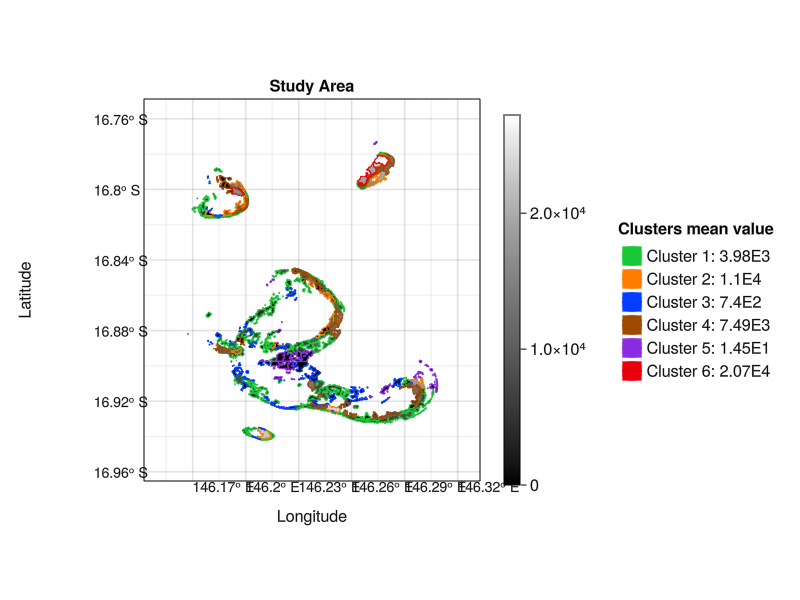
Rule Induction (using Series Clusters)
The SIRUS Rule Induction algorithm (Bénard et al. 2021) can be used for scenario discovery by summarising scenarios in terms of binary rules, i.e. thresholds below/above which a factor will lead to a specified outcome.
For this example, we cluster scenarios with similar total cover, and then focus on those with high temporal variability in total cover. We explore what intervention characteristics lead to high temporal variability.
# Find Time Series Clusters
s_tac = ADRIA.metrics.scenario_total_cover(rs)
n_clusters = 6
clusters = ADRIA.analysis.cluster_scenarios(s_tac, n_clusters)

# Identify cluster(s) with highest median temporal variability covering at least 1% of scenarios
# N.B. different aggregation metrics and size limits could also be specified
target_clusters = ADRIA.analysis.target_clusters(clusters, s_tac)
When the SIRUS Rule Induction algorithm produces rules involving two factors, they can be visualised as scatterplots.
# Select features of interest to use in rules.
# This includes all factors related to interventions and criteria to decide where to perform coral seeding.
foi = ADRIA.component_params(rs, [Intervention, SeedCriteriaWeights]).fieldname

# Use SIRUS algorithm to extract up to 10 rules.
max_rules = 10
rules_iv = ADRIA.analysis.cluster_rules(
    rs, target_clusters, scens, foi, max_rules; remove_duplicates=true
)


# Plot scatterplots for each rule highlighting the area selected by each of them
rules_scatter_fig = ADRIA.viz.rules_scatter(
    rs,
    scens,
    target_clusters,
    rules_iv;
    fig_opts=fig_opts,
    opts=opts
)

# Save final figure
save("rules_scatter.png", rules_scatter_fig)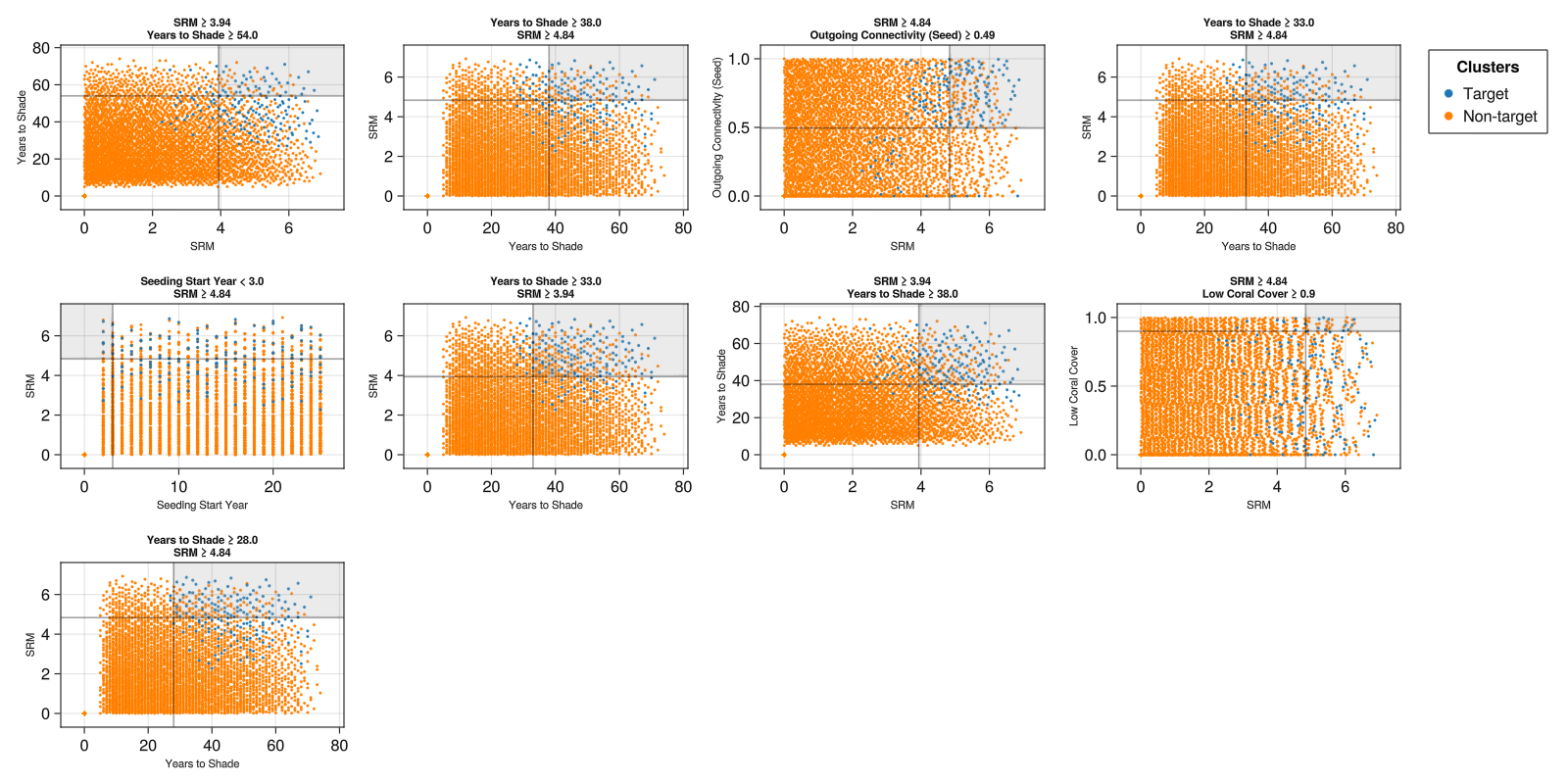
When defining binary rules, it is expected that there will be a tradeoff between coverage and density (Bryant & Lempert 2010). Not all target scenarios will be captured (low coverage), and not all scenarios captured by the rule will be target scenarios (low density). It is possible for a rule to increase coverage by accepting lower density, and density can often be increased by accepting lower coverage.
In these results, a number of rules have many blue points outside the grey area - the rule has low coverage of the target scenarios, e.g., in SRM > 3.94 & Years to Shade > 54.0.
A number of rules also have many orange points within the grey area - the rule has low density of target scenarios, e.g., SRM > 3.94 & Years to Shade > 38.0.
SRM and Years to Shade have been selected as key factors in several of the rules. In this dataset, high temporal variability is obtained when a large reduction in DHW is applied, and for a long period of time. This may reflect a large increase in coral cover - but would need further investigation.
Rules also suggest that high temporal variability is also obtained when putting high weight on selecting locations with high outgoing connectivity and low coral cover - in combination with high shading. The rule favouring low coral cover has very low coverage - there are many target scenarios that also do not have low coral cover.
For this dataset, according to this analysis:
- Ensuring conditions for success: Temporal variability might be a proxy for high improvement over time, and the scenarios could be visualised or another more specific metric could be used to verify this. It would be unsurprising for high shading to support success.
- Avoiding failure: Binary rules implicitly define scenarios that are excluded. High temporal variability is rarely achieved without high levels of shade.
- Planning for failure modes: A recommendation to favour locations with high outgoing connectivity combined with high SRM seems like it would warrant further investigation - the rule includes many target scenarios (high coverage), but also many scenarios with lower temporal variability (high density).
- Further deliberation: The rules describe very high levels of shading for long periods of time, which may be difficult to achieve. Temporal variability is not directly connected with measures of success - alternative metrics to summarise clusters could be explored. Other algorithms, e.g., PRIM, could also be used to give greater control over coverage and density (Bryant & Lempert 2010).
Regional Sensitivity Analysis
Regional Sensitivity Analysis is a Monte Carlo filtering approach. The aim of RSA is to aid in identifying which (group of) factors drive model outputs and their active areas of factor space.
This implementation divides factors into bins and compares the distribution of a selected outcome within each bin to the distribution outside the bin.
# As outcome, we are looking at total coral cover, averaged over time
s_tac = ADRIA.metrics.scenario_total_cover(rs)
mean_s_tac = dropdims(mean(s_tac, dims=1), dims=1)

# Factors of interest to investigate
foi = [
    :dhw_scenario, # All DHW scenarios in the domain data, here scenarios 1-50 in the test dataset
    :wave_scenario, # All wave scenarios specified in the domain data, here scenarios 1-50 in the test dataset
    # Interventions
    :N_seed_TA,  # Number of seeded Tabular Acropora deployed per intervention event
    :N_seed_CA, # Number of seeded Corymbose Acropora deployed per intervention event
    :fogging, # Fogging effectiveness on a scale of 0-1
    :SRM # Reduction in DHW obtained by shading
]

# Divide factors into 10 bins
# Test whether each bin has significantly different total cover to rest of the bins
tac_rs = ADRIA.sensitivity.rsa(rs, mean_s_tac; S=10)
rsa_fig = ADRIA.viz.rsa(
    rs,
    tac_rs,
    foi;
    opts,
    fig_opts
)

save("rsa.png", rsa_fig)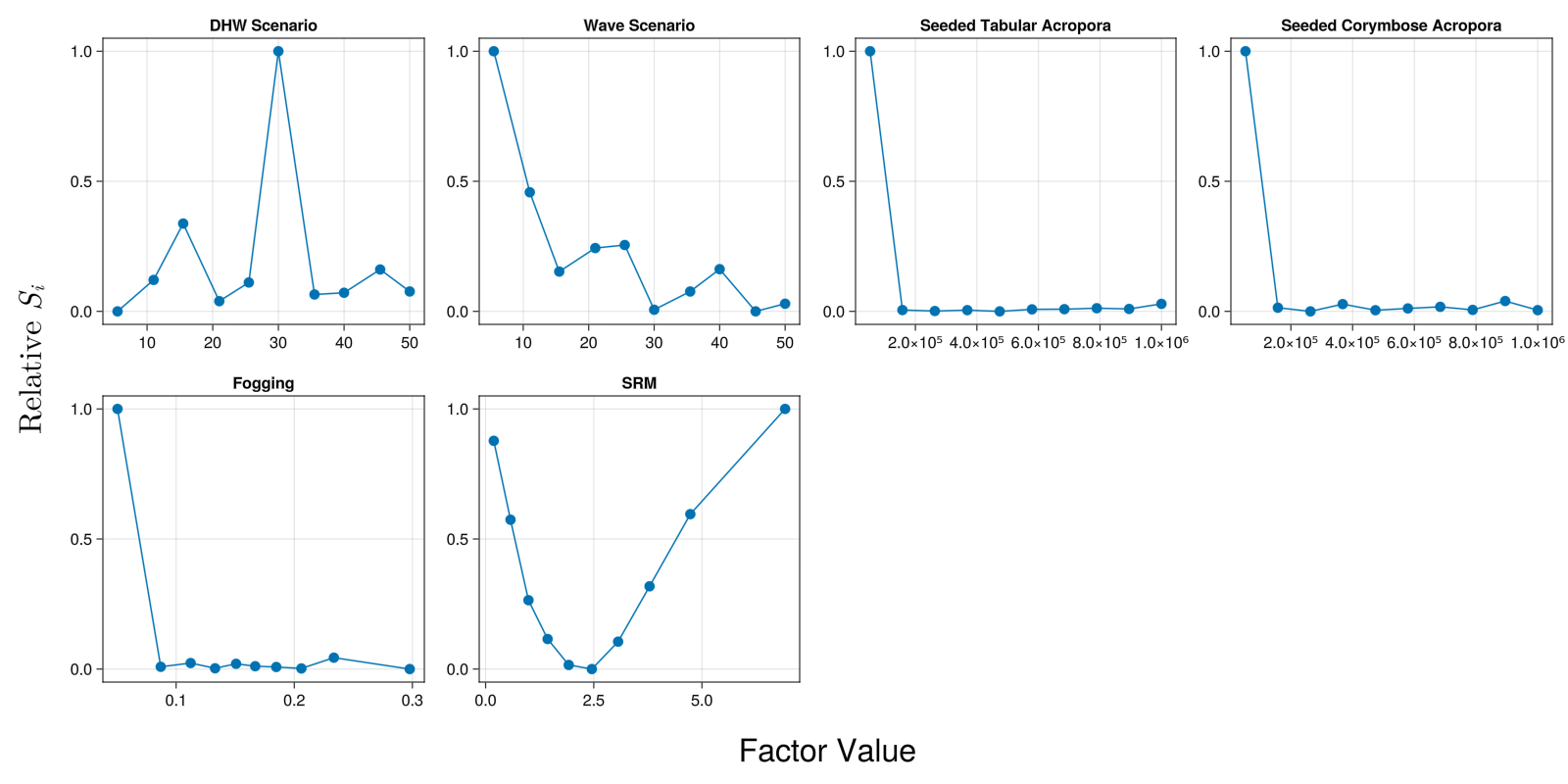
For this test data package, the results would suggest that bins that have very different coral cover to those outside that bin include:
- DHW Scenario: The 5 scenarios in the bin around scenario 30
- Wave Scenario: The first 5 scenarios
- Seeded Tabular Acropora and Seeded Corymbose Acropora: Low numbers of coral seeded
- Fogging: Low effectiveness
- SRM: Low and high levels of SRM. Scenarios with a DHW reduction of about 2.5 are most similar to those outside that bin.
Results are likely to be dependent on how the sample of scenarios was obtained. A different sample might result in different sensitivities. Testing of convergence may be needed.
Outcome mapping
As the name implies, outcome mapping aims to identify the relationship between model outputs and the region of factor space that led to those outputs. Similarly to Regional Sensitivity Analysis, it does this by filtering scenarios that match a specific outcome.
This implementation then calculates the mean value of an outcome as a function of a factor. This is a form of scenario discovery that summarises scenarios matching an outcome in terms of values of a factor and the average value of one outcome.
This example aims to identify DHW and wave scenarios and interventions which lead to top outcomes for coral cover. Note that it uses a test dataset rather than real data.
# As outcome, we are looking at total coral cover, averaged over time
s_tac = ADRIA.metrics.scenario_total_cover(rs)
mean_s_tac = dropdims(mean(s_tac, dims=1), dims=1)

# Factors of interest to investigate
foi = [
    :dhw_scenario, # DHW scenarios 1-50 in the test dataset
    :wave_scenario, # Wave scenarios 1-50 in the test dataset
    # Interventions
    :N_seed_TA, # Number of seeded Tabular Acropora deployed per intervention event
    :N_seed_CA, # Number of seeded Corymbose Acropora deployed per intervention event
    :fogging, # Fogging effectiveness on a scale of 0-1
    :SRM # Reduction in DHW obtained by shading
]

tf = Figure(size=(1600, 1200))  # size of figure

# Indicate factor values that are in the top half of the range
#   mean_s_tac is normalised to [0,1], so 0.5 is half-way between the minimum and maximum values
# Split each factor into 20 bins
tac_top_50 = ADRIA.sensitivity.outcome_map(rs, mean_s_tac, x -> any(x .>= 0.5), foi; S=20)
ADRIA.viz.outcome_map!(
    tf[1, 1],
    rs,
    tac_top_50,
    foi;
    axis_opts=Dict(:title => "Regions which lead to Top 50th Percentile Outcomes", :ylabel => "TAC [m²]")
)

# Indicate factor values that are in the top 30% of the range
tac_top_30 = ADRIA.sensitivity.outcome_map(rs, mean_s_tac, x -> any(x .>= 0.7), foi; S=20)
ADRIA.viz.outcome_map!(
    tf[2, 1],
    rs,
    tac_top_30,
    foi;
    axis_opts=Dict(:title => "Regions which lead to Top 30th Percentile Outcomes", :ylabel => "TAC [m²]"))

save("outcome_map.png", tf)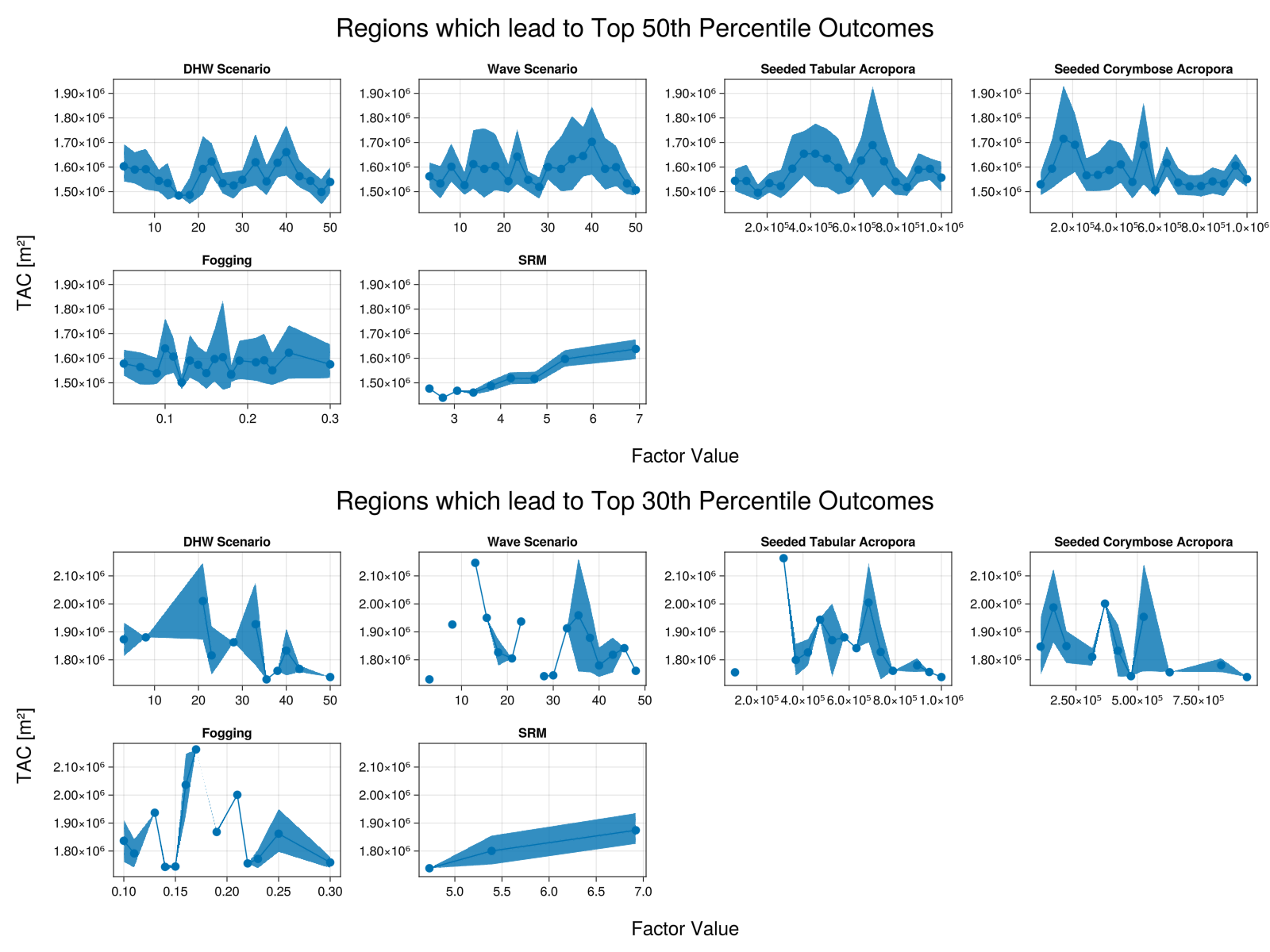
The figure shows the mean values of total coral cover (TAC) obtained as a function of each factor value, across scenarios in which outcomes in the top 50% or 30% of the range are obtained. The ribbon shows the estimated 95% confidence interval around the mean.
There is less uncertainty in the mean for the top 30% because there were fewer scenarios in this group. The top 30% scenarios are a subset of the scenarios in the top 50%.
While this example uses a test data package rather than real data, we can still interpret the results:
- DHW scenario:
- These are categorical values representing 50 different scenarios. There is no specific order to the scenarios - they are just interpreted individually.
- Note that as
S=20, only 20 bins are shown - multiple scenarios have been aggregated. - All 50 scenarios are represented in the top 50% of the range - it is possible to get results in the top half of the range in all scenarios. Coral cover is higher in scenarios ~20-25, ~35 and ~40, and lower in scenarios ~15 and ~45. To interpret this, we would need to look at the definition of those scenarios.
- In the top 30% of the range, only some scenarios are represented. For the DHW scenarios that are missing, none of the combinations of factors sampled are able to achieve results in the top 30% of the range.
- Wave scenario: categorical variable representing each scenario in the test data package
- Note: Wave scenarios are no longer active as of ADRIA v0.7.0
- Seeded Tabular Acropora and Seeded Corymbose Acropora
- Coral cover in the scenarios varies substantially as number of seeded corals increase. There is substantial uncertainty in the mean, but even so there is no clear pattern. Outcomes are likely more heavily influenced by other factors in the scenario set.
- Top 30% scenarios are obtained even with fewer seeded corals, though in fewer scenarios - there is very little uncertainty in the mean.
- Fogging:
- Similar to seeding, there is no clear pattern to coral cover as fogging effectiveness increases.
- Only scenarios with at least 0.1 fogging effectiveness are in the top 30% of the range.
- SRM:
- As expected, coral cover increases with shade (decreases with DHW) in both groups of scenarios.
- In the top 30% of the range, the scenario with the lowest level of shade still has about 4.5 DHW reduction.
- In the top 50% of the range, the scenario with the lowest level of shade still has about 2.5 DHW reduction.
- There are very few scenarios in the top 50% with shade giving reductions of less than 3 DHW - there is very little uncertainty in the mean.
For this test dataset, according to this analysis:
- Ensuring conditions for success: Shade (SRM) is dominating the analysis. To be in the top 30% of the range, shade with at least ~4.5 DHW reduction is necessary. Fogging with an effectiveness of at least 0.1 is also needed.
- Avoiding failure: In some DHW scenarios, none of the sampled interventions are able to achieve performance in the top 30% of the range. Whether this is a problem depends on what those scenarios represent.
- Planning for failure modes: There are DHW scenarios for which high levels of SRM are not in the top 30% of the range - despite its cost, SRM has not delivered. This might warrant investigation as to why SRM was not sufficient in those scenarios.
- Further deliberation: High levels of SRM may be controversial both in terms of feasibility and cost. There is likely to be further debate about whether these scenarios should be considered, and whether top 30% of the range is an appropriate criteria for success.
Additional sampling may be be needed to confirm findings where no matching scenarios were found.
Data Envelopment Analysis
Performs output-oriented (default, input-oriented can also be applied) Data Envelopment Analysis (DEA) given inputs X and output metrics Y. DEA is used to measure the performance of entities (scenarios), where inputs are converted to outputs via some process. Each scenario's "efficiency score" is calculated relative to an "efficiency fromtier", a region representing scenarios for which outputs cannot be further increased by changing inputs (scenario settings).
dom = ADRIA.load_domain("path to domain", "45")
scens = ADRIA.sample(dom, 128)
rs = ADRIA.run_scenarios(dom, scens, "45")
n_scens = size(scens,1)
# Get cost of deploying corals in each scenario, with user-specified function
cost = cost_function(scens)
# Get mean coral cover and shelter volume for each scenario
s_tac = dropdims(
mean(ADRIA.metrics.scenario_total_cover(rs); dims=:timesteps); dims=:timesteps
)
s_sv =
dropdims(
mean(mean(ADRIA.metrics.absolute_shelter_volume(rs); dims=:timesteps); dims=:locations);
dims=(:timesteps,:locations)
)
# Do output oriented DEA analysis seeking to maximise cover and shelter volume for minimum
# deployment cost.
DEA_scens = ADRIA.analysis.data_envelopment_analysis(cost, s_tac, s_sv)
dea_fig = ADRIA.viz.data_envelopment_analysis(rs, DEA_scens)
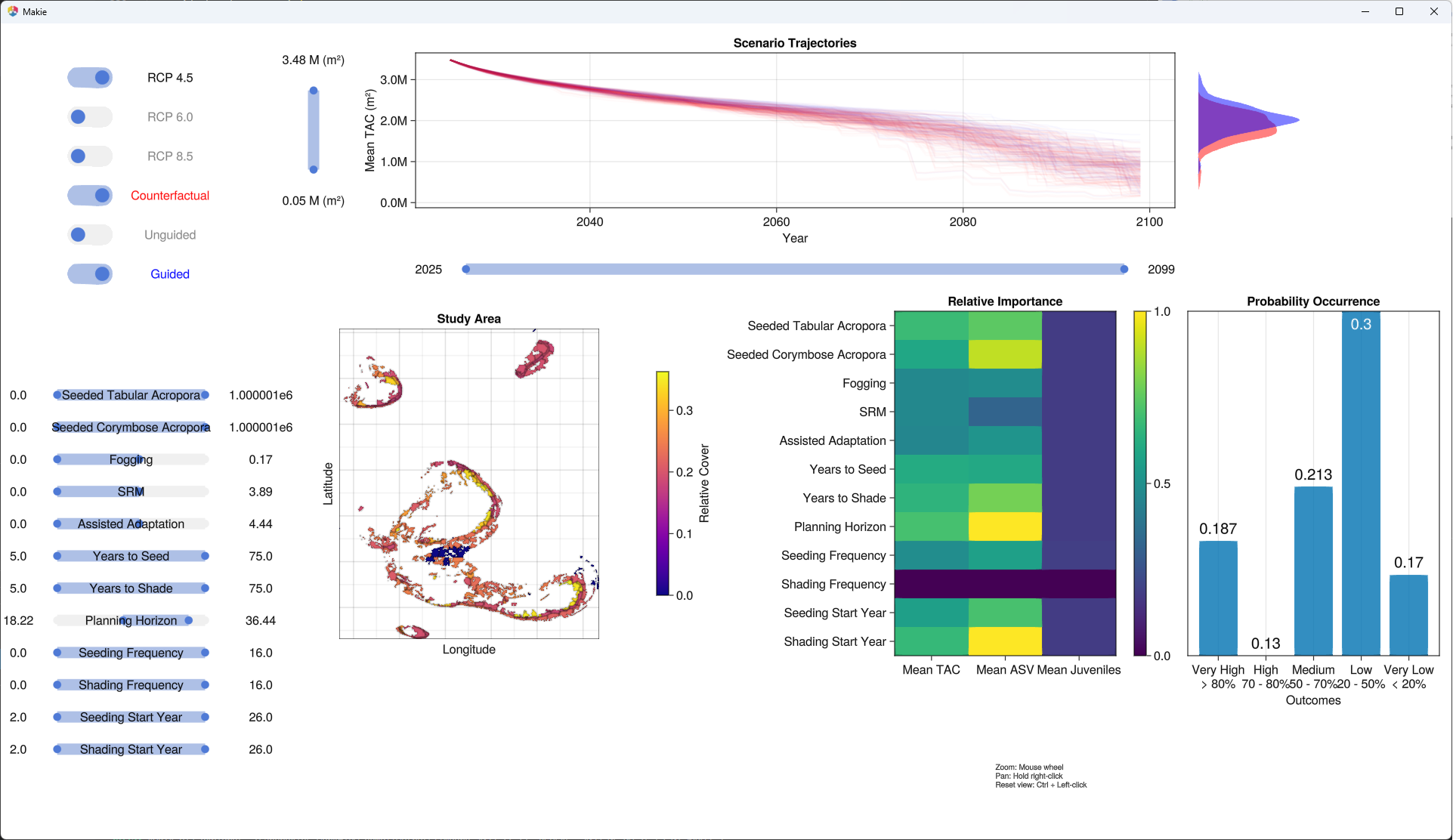
GUI for high-level exploration (prototype only!)
# To explore results interactively
ADRIA.viz.explore("path to Result Set")

# or, if the result set is already loaded:
# ADRIA.viz.explore(rs)